Free & Open Source · macOS 15+

Fan control that
stays out of your way

CoolMyMac is a lightweight Menu Bar utility that gives you full control over your Mac's fans — without the complexity. Built for Apple Silicon and Intel, under 2 MB.

Copy
$ brew tap ecc521/coolmymac
$ brew install --cask coolmymac
Or see all install options ↓

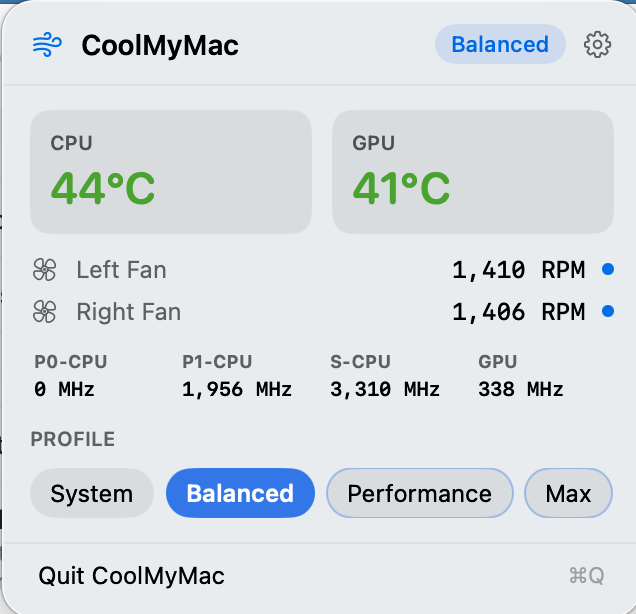
CoolMyMac in the menu bar and its popover showing CPU/GPU temps, fan speeds, and profile selection

Features

Everything you need, nothing you don't

🌡️

Live Thermal Status

The Menu Bar icon shifts from green to red as your CPU and GPU heat up — giving you an instant at-a-glance thermal read without opening anything.

🍎

Apple Silicon & Intel

Native, low-level IOKit sensor readings on both architectures. Package power, CPU/GPU temperatures, and clock speeds — all from one app.

🎚️

Fan Profiles

Choose from System (Apple defaults), Balanced, Performance, or Max — or dial in your own Custom curve with any min/max RPM you like.

Zero-Overhead Daemon

A secure background helper uses native SMAppService and XPC. It's purely event-driven — zero CPU cycles while idle, no polling loops.

🖥️

Command Line Interface

The bundled coolmymac CLI lets you script profile changes and query sensors from the terminal: coolmymac profile set max.

🔒

Secure by Design

The app runs unprivileged. Fan writes go through a code-signed XPC daemon — no sudo prompts, no persistent elevated processes outside of LaunchDaemon.

Installation

Get started in seconds

Manual

DMG Download

Download the latest release, open the DMG, and drag CoolMyMac to your Applications folder.

Download latest DMG
After launching: open Preferences (gear icon → General tab) and click Install Helper Tool. This one-time step installs the privileged daemon required for fan control and the full sensor suite.